
Components
A set is a component with variants. set names it; variants lists each variant property and its values; template is the node every variant starts from. Write a set this way: "type": "component-set" with a name is its long spelling and variantMatrix that of variants, read by the same reader, so they build the same set, but set is the one form the examples use.
{
  "set": "Raga/Card",
  "props": {
    "Name": "राग भैरव",
    "Hour": "MORNING",
    "Last": "Last riyaz 2 days ago · 25 min"
  },
  "variants": {
    "State": {
      "Learning": {},
      "New": {},
      "Locked": {
        "fill": "#F3EFF7",
        "props": {"Last": "Opens after 21 days of Yaman"}
      }
    }
  },
  "template": {
    "width": 300,
    "padding": 18,
    "gap": 8,
    "fill": "#FFFFFF",
    "cornerRadius": 20,
    "column": [
      {"eyebrow": "{Hour}", "color": "@mute"},
      {"deva-xl": "{Name}", "font": "Tiro Devanagari Hindi 24/30"},
      {
        "row": [{"swara": "रे॒"}, {"swara": "ध॒"}],
        "gap": 6,
        "only": "Learning"
      },
      {"small": "{Last}", "color": "@mute", "only": ["Learning", "Locked"]},
      {
        "name": "Progress",
        "only": "Learning",
        "stack": [
          {
            "type": "rectangle",
            "width": 264,
            "height": 6,
            "cornerRadius": 3,
            "fill": "@ink/8%"
          },
          {
            "type": "rectangle",
            "width": 180,
            "height": 6,
            "cornerRadius": 3,
            "fill": "@saffron",
            "at": "left"
          }
        ]
      },
      {
        "row": [
          {
            "text": "Start learning",
            "font": "Inter 14/20 700",
            "color": "#FFFFFF"
          }
        ],
        "padding": [8, 14],
        "cornerRadius": 16,
        "fill": "@ink",
        "only": "New"
      }
    ]
  },
  "behavior": {
    "axes": {
      "history": ["fresh", "practised"],
      "streak": {
        "values": ["short", "long"],
        "when": {"history": ["practised"]}
      }
    },
    "start": "Loading",
    "states": {
      "Loading": {"LOADED": "route"},
      "route": [
        "history == 'fresh' -> New", "streak == 'long' -> Learning", "Locked"
      ],
      "New": {"START": "Learning"},
      "Learning": {"PAUSE": "Locked"},
      "Locked": {"UNLOCK": "Learning"}
    },
    "plays": {"Begin a new raga": ["LOADED", "START"]},
    "targets": {"START": "Start learning"}
  }
}
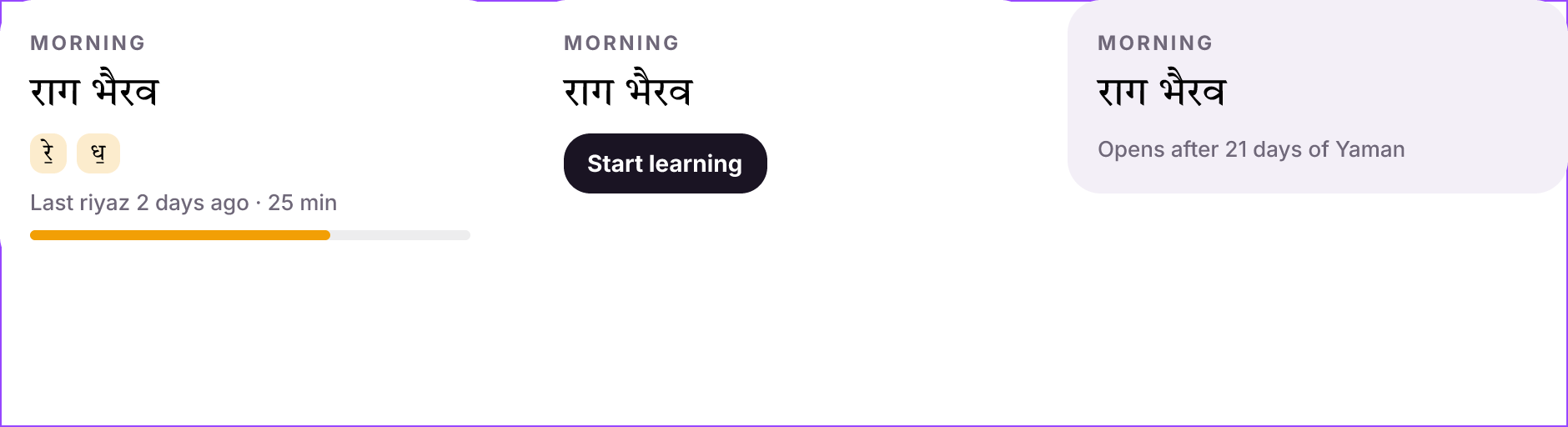
Three variants of a card. {Name}, {Hour} and {Last} bind texts to the set's properties; only keeps a layer to the variants that use it; the Locked variant sets its own Last.
Variants
"variants": {"State": ["Learning", "New", "Locked"]}
"variants": {"State": {"Learning": {}, "Locked": {"fill": "#F3EFF7"}}}
The first value of each property is the default. A value's map changes that variant: keys for the root, $nodes for named layers, and props for its own property values. A $nodes entry for a nested instance is written as the instance is: {"$nodes": {"Nav alerts": {"State": "Active", "Label": "Alerts"}}} puts the sidebar's Alerts item in its Active state in that variant only ($variant works too).
A text that names a variant property shows each variant's own value: {"text": "{Tier} plan"} reads "Free plan" in Tier=Free and "Pro plan" in Tier=Pro. No property needs declaring for it, and a text can name several ("{Lead} · {State}").
The set lays its variants out as a grid: the last property's values run across and the other properties' down, so Lead (7) × State (2) × Density (2) is 2 columns of 14 rows. "columns": "State" (or a list of properties) picks what runs across.
The set is drawn with a dashed purple outline around its variants in the app and in previews; each variant is a component of its own inside it.
Without variants, a set is one component that only has properties: {"set": "Date tile", "props": {"Month": "OCT", "Day": "30"}, "template": {...}} makes the template a component, and instances set Month and Day as with any set. There is no variant property to choose, so no dummy axis is needed.
Properties
props declares the set's properties once, with their defaults. A text written "{Name}" follows Name, and a property sets a whole text, so "{Action} →" is refused: give the arrow a text of its own. a layer with "visible": "{Show retry}" shows or hides with a boolean. Instances set them by name.
A nested instance's property can follow the set's: {"Pill": {"Label": "{Count}"}} in the template has the set's Count drive the pill's Label, so {"Badge": {"Count": "5"}} shows 5 in its pill, and the set's own variants show Count's default. The pill stays an instance of Pill.
A variant that sets its own value ("props": {"Last": "Opens after 21 days of Yaman"}) keeps that text; the property's value applies in the other variants. When every value of a variant property sets its own, no instance can change it, and the build warns INPUT_IGNORED: write the text in each variant instead, or leave one variant to follow the property.
A part's argument can be a property: {"chip": "{Hour}"} inside a template binds the chip's text to Hour.
Layers in some variants: only
"only": "Learning", "only": ["Learning", "Locked"], or "only": {"State": ["Learning"]}. In a set with several properties a plain value names the property that has it, and values of different properties must all hold (["Ready", "Bad"] is State=Ready and Tone=Bad); a value two properties share needs the map form. Other variants leave the layer out instead of hiding it, so a set with many views stays small. A layer only some variants hold can make those variants larger; the set gives each column and row the room of its largest variant, so that is fine.
Instances
Use a component by its name. Keys that name a variant property choose the variant; the rest set properties, or override a layer's text by name. name beside the component names the instance, which matters when a screen holds several: {"Plan": {"Tier": "Pro"}, "name": "Pro card"}.
An override ($override) names a layer of the instance, and reaches every layer of that name below it. When the instance holds instances that each have a layer of one name (a menu of items, each with an Icon), a path names one of them: {"$instance": "Menu", "$override": {"Settings > Icon": "lucide:settings", "Settings > Label": "Settings"}}, as find reads > .
An override of a nested instance takes the same form as the instance: {"Nav alerts": {"State": "Active", "Label": "Alerts"}} chooses its variant and then sets its properties, and a variant chosen this way keeps the values the component gave that instance (its label and its count stay). An override of a text says its words and their look; how the text sizes (to its words, to its lines, or fixed) stays the main component's, so changing the main's resize changes every instance's, overridden or not.
{
  "name": "Library",
  "gap": 20,
  "align": "start",
  "row": [
    {"Raga/Card": {"State": "Learning"}},
    {
      "Raga/Card": {
        "State": "New",
        "Name": "राग भीमपलासी",
        "Hour": "AFTERNOON"
      }
    },
    {
      "Raga/Card": {
        "State": "Locked",
        "Name": "राग मालकौंस",
        "Hour": "LATE NIGHT"
      }
    }
  ]
}

Three instances; each chooses its State and sets the raga's name and hour.
A bare value sets a component's only text property: {"Button": "Pay now"}.
Changing a set
Build it again with --replace: the set changes in place, so each variant keeps its identity and instances on every page follow, keeping what they set. When its variant properties change, a new set takes the old one's place and this page's instances move to the variants with the same names. facet find '[component=Plan]' lists a set's uses on the page showing, wherever the set itself is (a library page beside the screens), and facet components counts them and lists the components from other pages that the page uses. [--sync](update.md) changes it in place too, and is all that adding a value to a variant property needs ("Tone": ["Info", "Warn"] gaining "Bad"): the new variant is added and every instance stays as it was. Use --replace when a property is added, removed or renamed.