
Text
A string in a list of children is a text. It takes its font and color from the nearest container that sets them, or from the kit's font.
{
  "name": "Type",
  "font": "Inter 15/22",
  "gap": 8,
  "width": 360,
  "padding": 20,
  "fill": "#FFFFFF",
  "column": [
    {
      "text": "Practise the raga",
      "font": "Fraunces 36/40 600 -1"
    },
    {
      "text": "Evening · first prahar",
      "font": "Inter 12/16 700 +1.6 caps",
      "color": "#D9485F"
    },
    {
      "text": "Every note is shuddha except tivra Ma.",
      "font": "17/26"
    },
    {
      "text": "यमन · कल्याण थाट",
      "font": "Tiro Devanagari Hindi 20/28"
    },
    {
      "text": "Last riyaz 2 days ago",
      "font": "13/18 500 italic",
      "color": "#6F6879"
    }
  ]
}
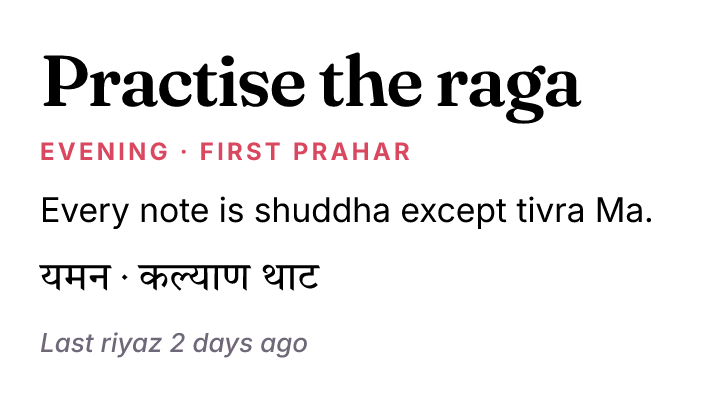
One container sets Inter 15/22; each text changes only what differs. 17/26 keeps the family and changes the size; italic and a weight add to it.
The font shorthand
"Family Size/LineHeight Weight" and optional words, in any order after the size: italic, letter spacing with a sign (+0.4, -2%) and a case (caps, lower, title). Leave the family out to keep the inherited one. The full grammar is in Font.
| You write | Means |
|---|---|
"Inter 15/22" | Inter, 15 px, 22 px line height |
"Fraunces 44/1.1 600 -1" | line height 1.1 × size, weight 600, letter spacing −1 px |
"12/16 700 +1.6 caps" | inherited family, uppercase, spaced |
Presets
A kit type preset is a text style. {"title": "Today"} is a text in it; "style": "title" on a container makes it the default for the texts inside. A text's own font replaces a preset.
A text in a box
padding on a text puts it in a box, as CSS does: {"text": "Dismiss", "name": "Dismiss", "padding": [6, 8], "fill": "@paper", "cornerRadius": 6} builds a hugging row with that padding named Dismiss, holding the text named Dismiss text (Dismiss > Dismiss text; Label when the text has no name), so overrides of a Label of your own never reach it. The box takes the keys of a box: fill (its background), stroke, strokeWidth, cornerRadius, effects, opacity, the name and key, and the place and size (at, x, y, width, height, grow). The text keeps the rest, so color is the text's. A box given a width gives the text the room across, and the text wraps in it. A text already built takes no padding through modify; build it in its box.
verticalAlign places a text's lines in a box taller than they are: {"text": "A", "font": "Fraunces 40", "width": 80, "height": 120, "verticalAlign": "center"} keeps its 120 px box and sets the letter in its middle (top is the default, bottom sets the last line on the box's bottom; Figma's textAlignVertical reads as it). A text given a height with center or bottom keeps that height; otherwise a text's box follows its lines and there is no room to place them in. In the app, Align in the Text section does the same for a text whose box has a fixed size.
A width as measured: "fractional"
A text that hugs is as wide as the next whole unit past its words, so the layers beside it land on whole pixels: Workflow in Inter 11 measures 50.22 and takes 51. "fractional": true keeps the 50.22. A browser sizes text this way, so a row of labels read from a page with facet react dom is fractional: nine chips each rounded up ended the row four pixels from where the page has it. It is a text's own setting ({"text": "Workflow", "fractional": true}), a sentence gives it to its words, source writes it back, and a file that has one needs this version to open. A text with a width keeps that width either way. The inspector does not show it; facet inspect does.
A size that fits: "fontSize": "fit"
{"title": "Lessons from Wake", "width": "fill", "fontSize": "fit"} takes the largest whole size at which the text fits, measured by the engine that draws it once the layout is known. Nothing is guessed from the number of characters.
| The text has | It fits |
|---|---|
a width (a number or "fill") | one line at that width |
a width and "maxLines": 2 | that many lines |
a width and a "height" | every line inside that height (the text's box still follows its lines) |
{"fit": {"min": 12, "max": 64}} bounds the size (8 to 400 otherwise). The line height scales with the size, so write the preset's as you would anyway. A FONT_FIT note names the size it took; when the text cannot fit even at the smallest, TEXT_OVERFLOW says so. build --sync fits again when the words or the width change. A text without a width has nothing to fit and is reported.
To know a text's size without building it, facet probe @block.json lays nodes out on a scratch copy and returns each node's size and each text's lines; it leaves nothing in the document, and takes a root of thousands of layers.
What wins
From strongest to weakest: keys written on the text (fontSize, color), the text's own font, its own style, then what the nearest container passes down (font or style, and color), then the kit's font. A span's own keys win over all of these for its characters: a text in a preset with {"text": "code", "fontFamily": "JetBrains Mono"} among its spans sets that word in the mono font and the rest in the preset, which they keep following. source writes such a text as its spans.
Sentences with components
"type": "paragraph" with runs mixes text and nodes. It wraps like text: each word is a text in the paragraph's font, nodes stay in place, and punctuation that touches a node stays on its line. A run of styled text ({"text": "GUARDRAIL span", "fontWeight": 600}) is split into words the same way, in the paragraph's font with its own keys on top. It takes the paragraph's font even where the kit or the container says another. A line break ("\n") in a run ends the line: the words after it start the next one. textAlign on a paragraph (center, right) sets each of its lines there.
{
  "kit": {
    "parts": {
      "tag": {
        "params": {"label": "", "tone": "#D9485F"},
        "node": {
          "row": [{"text": "{label}", "font": "Inter 13/18 600"}],
          "padding": [1, 7],
          "cornerRadius": 6,
          "fill": "{tone}/18%"
        }
      }
    }
  },
  "nodes": [
    {
      "name": "Digest",
      "font": "Inter 16/24",
      "width": 340,
      "padding": 20,
      "fill": "#FFFFFF",
      "column": [
        {
          "type": "paragraph",
          "width": "fill",
          "runs": [
            "Checkout errors rose ",
            {"tag": "+38%"},
            " on Saturday, the most since ",
            {"tag": {"label": "Tue 14 Oct", "tone": "#6F6879"}},
            ". Two agents stopped sending traces overnight."
          ]
        }
      ]
    }
  ]
}
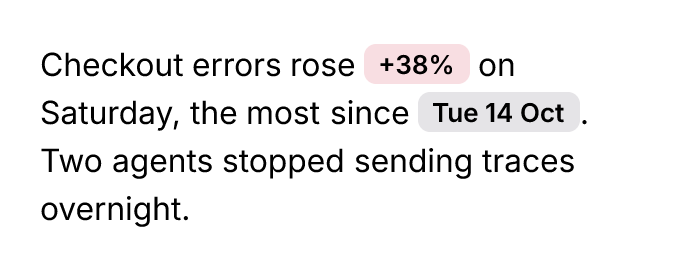
A chip part used twice inside a sentence. Words sit a space of their font apart and lines a line height apart, as in a text of the same style; wordSpacing and lineGap (added between lines) change that.
Lists
{"list": ["Open the file", ["Check the name", "Check the size"], "Save it"], "marker": "number"} builds one text, an item per paragraph. A list inside the list nests its items one level under the item before it. marker is bullet (the default: •, then ◦ and ▪ deeper), number (1., then a. and i. deeper, counting per level), check, or any characters ("–", "→"). A check item written "[x] Done" is ticked and "[ ] Todo" is not; the brackets are not drawn. indent is the space per level (1.5 times the size, widened so the longest marker fits), start the first number, and gap the space between items.
Each marker hangs before its item, ending a little before the text, so numbers line up on their periods. Lines that wrap start at the item's indent, not under the marker. On a text built another way, "list": "bullet" (or {"marker", "indent", "start", "gap"}) makes each paragraph an item. Its leading tabs are its level, and "list": "none" ends the list. In the app, the List menu of the Text section does the same. Tab anywhere in an item nests it one level, Shift-Tab brings it back out (with a selection, every item it touches moves), and Backspace at an item's start brings it out too.
Columns and drop caps
A text with a width sets its lines in columns, filled in turn, with gap between them (the line height when left out). A text whose height follows its content balances its columns; a text of fixed height fills each column to its height and hides the lines past the last, ending in an ellipsis when it truncates. dropCap sets the first letter large across that many lines, from the first line's capitals down to the last line's baseline, and the lines beside it start after it: write the lines alone ("dropCap": 3) or with its font (a family and a weight, "Fraunces semibold"; its size follows the lines), color and gap (the space before its lines, a quarter of the text's size unless set). paragraphIndent starts the first line of each paragraph that far in; as books set it, the text's first paragraph is not indented unless {"size": 11, "first": true}.
{
  "kit": {
    "colors": {"ink": "#1A1423", "rose": "#B8742A"},
    "type": {"body": "Source Serif 4 15/23"}
  },
  "nodes": [
    {
      "name": "Article",
      "width": 600,
      "padding": 24,
      "gap": 12,
      "fill": "#FFFDF8",
      "color": "@ink",
      "column": [
        {"text": "The hour before the lamp", "font": "Fraunces 26/30 600"},
        {
          "name": "Body",
          "body": "The evening raga begins before the musician plays. It starts in the half light, when the tanpura settles and the room learns its own pitch. Yaman rises with a sharpened fourth that leans toward the fifth, a small tension that the whole evening resolves. Listen for the way the singer returns to the same phrase, each time a little wider, until the phrase is the room and the room is the hour.",
          "width": "fill",
          "columns": 2,
          "gap": 20,
          "dropCap": {"lines": 3, "font": "Fraunces 600", "color": "@rose"}
        }
      ]
    }
  ]
}
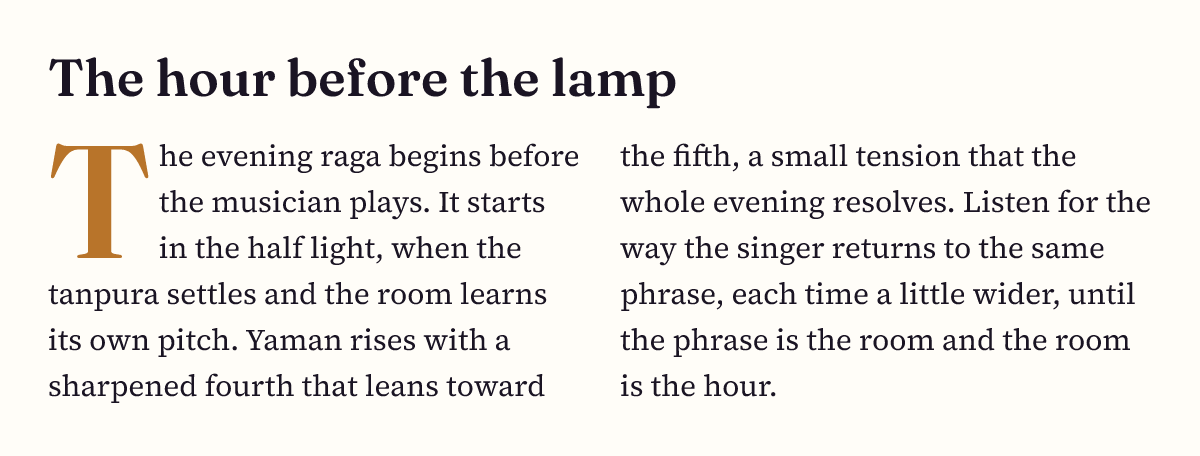
One text in two balanced columns with a three-line drop cap in another face and color. Edits reflow it; it stays one layer.
The drop cap is the paragraph's first letter (with its accents), even in a face that joins it to the next one, such as a blackletter "Th": the ligature breaks there and the rest of the word stays in the text. A kit type preset can hold both ("lede": {"font": "Source Serif 4 18/28", "dropCap": 3}), and every text in it then has them; source writes them on a text only when its preset does not. Copying from an exported PDF reads the drop cap as the first letter and the columns in order.
Flowing around a layer
textWrap on any layer (a photo, a shape, a frame) makes the texts that share its parent flow around its box, the number keeping them that far clear. Set it on the obstacle, not on the text, as print does: a text never names what it flows around, and a layer placed with at still pushes its texts aside. Beside it, a line continues across to the other side while both sides hold a proper line (about twelve ems each), and otherwise takes the wider side (keeping to the side the line above took while that side is nearly as wide, so lines run down one side of a shape rather than zigzag across it), so a layer in the middle of a column has text on both sides and one at an edge has text beside it. {"offset": 12, "side": "largest"} always takes the wider side, "both" every side with room for a few words, "left" or "right" keeps lines to one side, "neither" passes them above and below only, and a line with too little room moves below it. The clearance holds on every side, below the box too: a line whose top is less than the offset under the box's bottom is still shortened (a 60-high initial with offset 7 shortens lines down to 67), so size a drop initial to the lines it should span. A text with a drop cap beside a wrap sets the cap where its first line starts, after the layer, and the lines the cap spans start after the cap and follow the layer's edge. A text whose height follows its content grows to the lines it needs; "none" stops it. A text in columns does not flow around anything yet. A story flowing through frames counts its layers too: a frame with a figure across its top takes only the lines that fit below it, and the next frame starts after them.
{
  "name": "Page",
  "width": 520,
  "padding": 24,
  "fill": "#FFFDF8",
  "color": "#1B1712",
  "stack": [
    {
      "name": "Body",
      "width": 472,
      "font": "Source Serif 4 15/22",
      "textAlign": "justified",
      "at": [0, 0],
      "text": "The tanpura is not played so much as kept. Four strings, plucked in turn, never quite the same twice, and the room fills with overtones that the singer leans on. Every note is measured against it; the drone is the floor the evening stands on. Listen long enough and the drone stops being a sound and becomes the room itself, the way the rain outside stops being weather and becomes the hour."
    },
    {
      "name": "Photo",
      "size": [160, 150],
      "fill": {
        "linear": ["#B8742A", "#5B3A1E"],
        "angle": 160
      },
      "cornerRadius": 4,
      "at": "top right",
      "textWrap": 12
    }
  ]
}
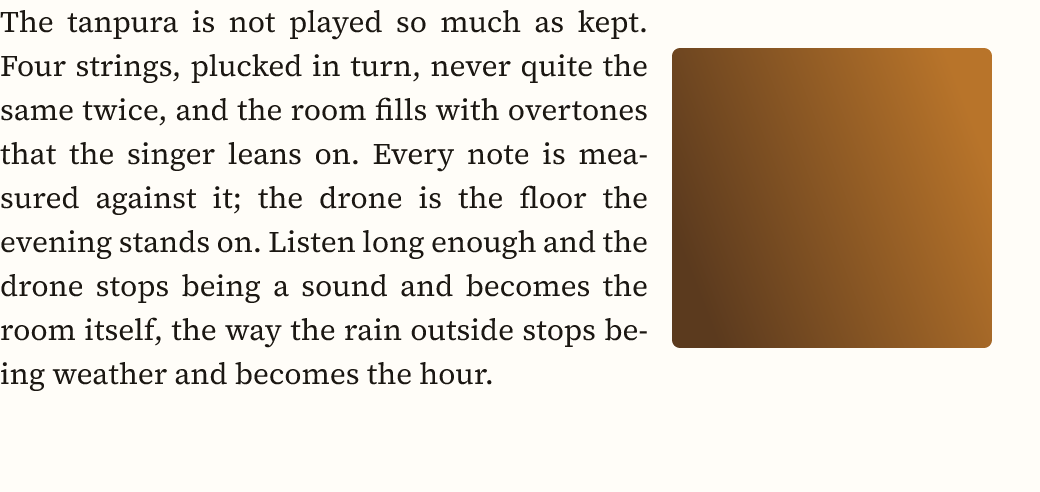
A justified text in a stack with a block at its top right: the lines beside the block shorten, hyphenating where they must, and run the full width below it.
"around": "outline" follows the layer's shape instead of its box: lines beside a circle end along its curve, lines beside a triangle step along its sides, and a path, a drawing or a group of shapes (an imported SVG, an icon) works the same way. The clearance stays the same distance all round the curve. A picture is wrapped by its opaque part, so a cut-out (a PNG with a transparent background) works like a drawn shape and an ordinary photo keeps to its box; a tiled picture, and a text, keep to their box. "textWrap": "outline" is the same with no clearance.
{
  "name": "Page",
  "width": 520,
  "padding": 24,
  "fill": "#FFFDF8",
  "color": "#1B1712",
  "stack": [
    {
      "name": "Body",
      "width": 472,
      "font": "Source Serif 4 15/22",
      "textAlign": "justified",
      "at": [0, 0],
      "text": "The tanpura is not played so much as kept. Four strings, plucked in turn, never quite the same twice, and the room fills with overtones that the singer leans on. Every note is measured against it; the drone is the floor the evening stands on. Listen long enough and the drone stops being a sound and becomes the room itself, the way the rain outside stops being weather and becomes the hour, and the hour becomes the raga."
    },
    {
      "name": "Moon",
      "draw": [
        {
          "circle": [80, 80, 80],
          "fill": {"linear": ["#B8742A", "#5B3A1E"], "angle": 160}
        }
      ],
      "size": 160,
      "at": ["top right", 0, 20],
      "textWrap": {"offset": 12, "around": "outline"}
    }
  ]
}
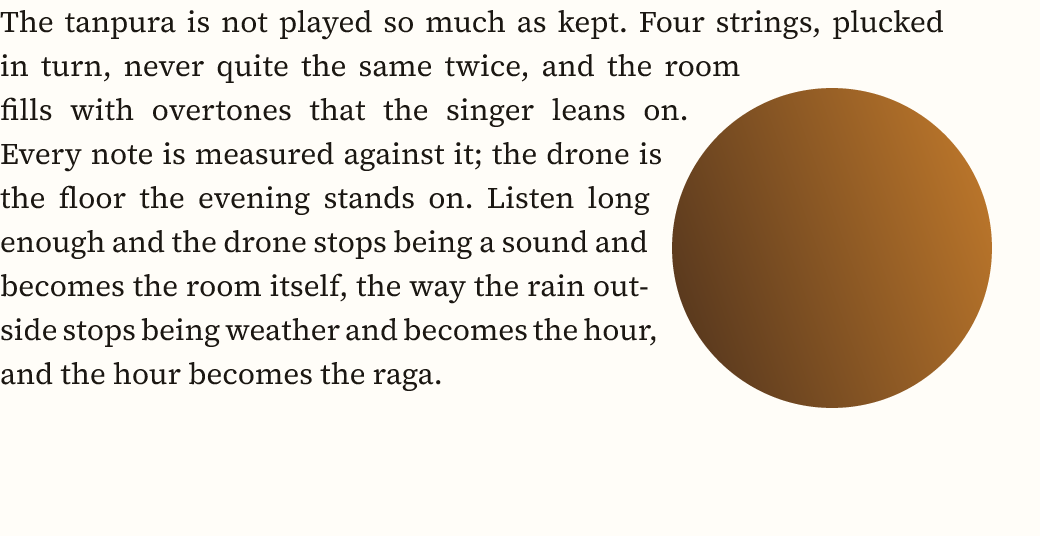
A justified text beside a circle: each line ends where the circle, twelve clear, meets it, so the text's edge curves in and out with it.
Flowing across frames
"flow": ["Col 1", "Col 2", "Col 3"] on a text writes a story once and sets it through those frames in order: the text fills the first frame, and each later frame gets a text box filling it that starts where the box before runs out, so a longer text moves on into the next column and a shorter one pulls back. The frames are named layers on the text's page, or on another page with {"frame": "Body", "page": "Page 2"} (an entry can also be {"frame": "Col 2"}); write the text inside the first frame or anywhere in the call, and it moves there. frames, thread and into read as flow. Every box keeps the story's style; each box can have its own columns. A box that ends at a paragraph break starts the next box with the next paragraph, as a page in print does, never with an empty line. The last box shows what is left, so a story longer than all its boxes runs past the last one (TEXT_TRUNCATED names it), and the reply notes the frames a story fills and how many characters the last does not hold (TEXT_FLOW), and a last frame holding only one or two lines of the story warns RUNT_FRAME, naming it; a box whose story goes on is not truncated, and shows no ellipsis. source writes the story once, with its flow, and a sync keeps the boxes it flowed into. A story that goes on onto another page keeps flowing there as you edit it; double-clicking its box on that page shows the page where the story starts and edits it there.
{
  "name": "Spread",
  "width": 764,
  "height": 300,
  "padding": 28,
  "gap": 24,
  "fill": "#FBF7F0",
  "color": "#2A2420",
  "row": [
    {
      "name": "Col 1",
      "width": 220,
      "height": 244,
      "column": [
        {
          "name": "Story",
          "font": "Source Serif 4 14/21",
          "textAlign": "justified",
          "flow": ["Col 1", "Col 2", "Col 3"],
          "text": "The evening raga begins before the musician plays. It starts in the half light, when the tanpura settles and the room learns its own pitch. Then a single phrase, held and released, tells the listener which evening this is.\nThe drone holds. The voice finds the fourth, leans on it, and the whole room leans with it until the phrase resolves. Nobody in the room is counting; the cycle counts for them, sixteen beats folded so that the first returns as a surprise every time.\nBy the third hour the phrases have grown long enough to lose the beginning before they reach the end, and that is the point: the raga is not a melody but a place, and the musician walks the listener through it, room by room, until the last note closes the door. Outside, the street has gone quiet."
        }
      ]
    },
    {"name": "Col 2", "width": 220, "height": 244},
    {"name": "Col 3", "width": 220, "height": 244}
  ]
}
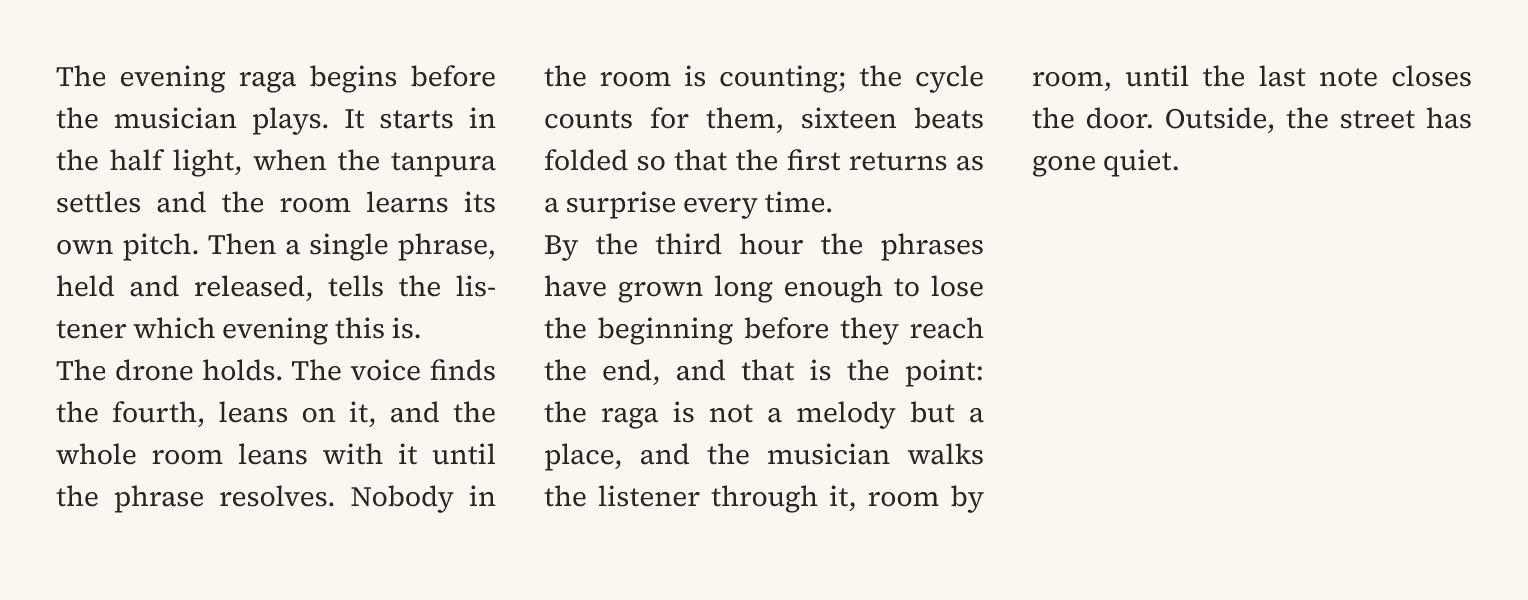
One story in three columns: it fills the first, goes on in the second where the first runs out, and ends in the third. Edits reflow it through all three.
In the app, editing any box of a story edits the story, from the character you clicked. While you type, every box keeps showing its part and the story reflows through them; clicks, drags and the caret move between the boxes. The Text section's Continues menu links a selected box to the box it continues, and text_continue with from does the same from the command line (null unlinks it).
Paragraphs in a story
"paragraph" on a span gives the paragraphs its characters start settings of their own; on a text it gives them to every paragraph. A paragraph takes the settings of its first character, as a word processor keeps them on the paragraph's mark, so they travel with the text through edits, copies, source and the file.
"heading": kept with the paragraph after it (a heading never ends a frame alone; it moves on with the first lines of what follows), not indented, and the paragraph after it starts flush, as books set it."item": a list item written with its own marker ("— ","1. "): its lines after the first start under its text, not under the marker."quote": every line starts in byinset."bullet","number"or"check": a list item whose marker Facet draws in the hanging space before it, so a story can mix body paragraphs and list items. Numbers count the items in a row (1., 2., then a., i. for deeper levels) and start over after a paragraph that is no item.{"list": "→", "level": 1}draws your own characters, one level in (levels 0 to 8, each a step further). Aliston the whole text makes every paragraph an item instead (see Lists).{"role", "indent", "hang", "inset", "spaceBefore", "spaceAfter", "keepWithNext", "keepTogether", "list", "level"}sets them one by one, in px:indentthe first line's (in place of the story'sparagraphIndent),hanghow far the later lines start in from it,insetevery line's,spaceBeforeandspaceAfterthe room above and below it (not at the top of a frame),keepWithNextthe heading's keep without its other settings,keepTogetherone frame or column for the whole paragraph unless it fills one alone."body"is a plain paragraph;"none"removes the settings.
On the text, orphans and widows (1 to 9) keep that many of a paragraph's lines together at the foot of a frame or column and at the head of the next; 1, the default, lets a paragraph break after any line. Keeps hold for a story across frames, for columns, and for a fixed box's last line.
{
  "name": "Pages",
  "width": 560,
  "height": 300,
  "padding": 28,
  "gap": 24,
  "fill": "#FBF7F0",
  "color": "#2A2420",
  "row": [
    {"name": "Left", "width": 240, "height": 244},
    {
      "name": "Right",
      "width": 240,
      "height": 244,
      "column": [
        {
          "name": "Chapter",
          "font": "Source Serif 4 13/19",
          "textAlign": "justified",
          "paragraphIndent": 13,
          "widows": 2,
          "flow": ["Left", "Right"],
          "spans": [
            "The evening raga begins before the musician plays. It starts in the half light, when the tanpura settles and the room learns its own pitch. Then a single phrase, held and released, tells the listener which evening this is.\nThe drone holds. The voice finds the fourth, leans on it, and the whole room leans with it until the phrase resolves.\n",
            {
              "text": "The third hour\n",
              "fontWeight": 600,
              "fontSize": 15,
              "paragraph": {"role": "heading", "spaceBefore": 19},
              "lineHeight": "19px"
            },
            "By now the phrases have grown long enough to lose the beginning before they reach the end, and that is the point.\n",
            {
              "text": "the raga is a place, not a melody, and the musician walks the listener through it;\nthe cycle counts, so nobody in the room has to.",
              "paragraph": "bullet"
            }
          ]
        }
      ]
    }
  ]
}
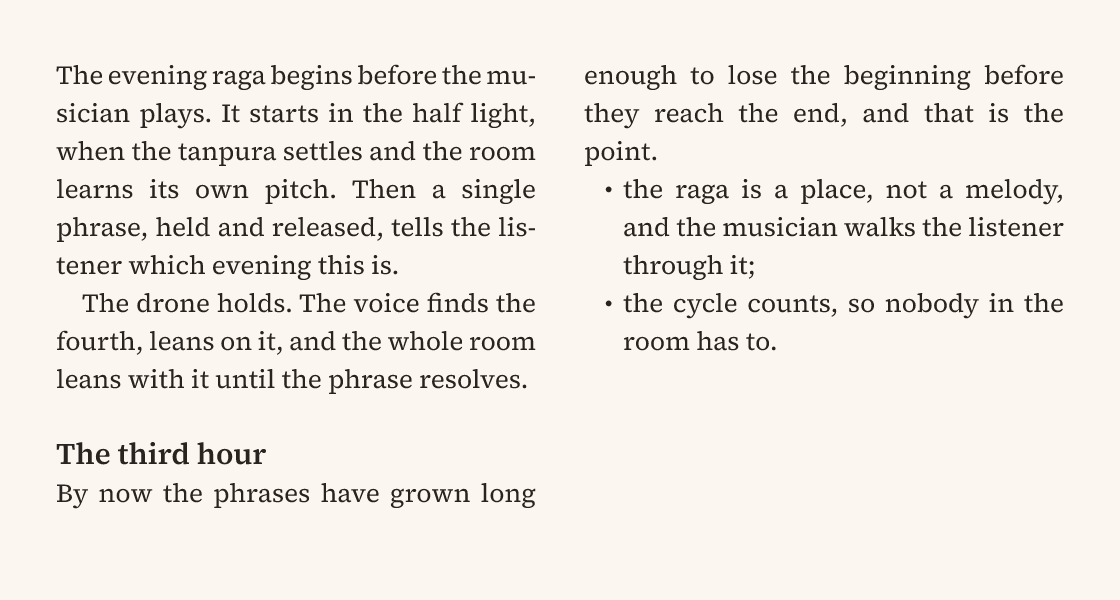
A chapter set across two pages: the heading has a line of space above it and keeps the 19 px grid, starts flush, and so does the paragraph after it; the bullets are drawn and their lines hang under the text; widows: 2 keeps two lines of a paragraph together at the top of the right page.
OpenType features
fontFeatures turns a font's OpenType features on or off, for a whole text or for a span: {"tnum": true} (tabular figures, which line up in a table's columns), ["smcp"] (small capitals drawn by the font, not shrunk capitals), {"onum": true} (oldstyle figures for running text), {"liga": false} (no ligatures), {"ss01": 1} (a stylistic set), {"cv11": 2} (the second alternate of a character variant), frac, sups, subs. A list turns tags on; a number picks an alternate; CSS's fontFeatureSettings ("\"tnum\" 1, \"smcp\"") is read as it. A font without a feature ignores it, and the text keeps its metrics; the build warns FONT_FEATURE_MISSING, naming the layer, the family and the tag (small capitals in Inter or Fraunces, which have none). Features travel with copies, source writes them, and a sync that leaves them out returns the font's defaults. They need the Rust text engine (the default); with CANVAS_SHAPER=coretext they are kept but not drawn.
Raised and lowered characters
A span's baselineShift sets its characters above the line (a positive number of px) or below it (negative). "super" and "sub" do the usual thing for the text's size: up a third of it (or down a sixth) and set at 65% of it, unless the span gives its own size: {"spans": ["E = mc", {"text": "2", "baselineShift": "super"}]}, H₂O with "sub", footnote marks. CSS's verticalAlign: "super" is read as it. The line keeps its height; a raised character reaching above it may touch the line before, as in print.
Underlines and strikethroughs
"underline": true draws the font's underline; "strikethrough": true its strikeout. Either takes a style word ("dotted", "dashed", "double", "wavy", "solid") or an object: {"underline": {"style": "dotted", "thickness": 1, "offset": 3}}. The thickness is in px (the font's when left out), and the offset puts an underline's top that many px below the baseline (the font's position when left out). Dots are squares a thickness wide and a thickness apart; dashes are three thicknesses long with two between; a double line is two lines a thickness apart; a wave's period is six thicknesses, and a wavy underline hangs below the letters. The line takes the characters' color. CSS's forms read as these: "textDecoration": "underline dotted 2px", textDecorationStyle, textDecorationThickness and textUnderlineOffset, so the email idiom border-bottom: 1px dotted on a link is "underline": {"style": "dotted", "thickness": 1}. Every output draws them: the canvas, PNG, SVG and PDF. inspect shows them as "textDecoration": {"line", "style", "thickness", "offset"}, which a build reads back.
Highlights
"highlight" on a span puts a fill behind its characters, a pill inside a sentence: {"spans": ["Spend rose ", {"text": "12% this week", "highlight": {"fill": "@lilac", "radius": 6, "padding": [1, 6]}}, " across teams."]}. A color alone is a highlight with square corners and no padding; "none" removes it. padding is [vertical, horizontal] px, or one number for both. The horizontal padding moves the words around the highlight apart, so the pill never touches them; the vertical padding only grows the fill. A highlight is drawn on each line it reaches, as CSS's inline backgrounds are: rounded where it starts and ends, square where a line breaks it. On a text, highlight covers all of it. In a span, CSS's background or backgroundColor with borderRadius and padding read as a highlight, so a captured <a style="background:#F1EEFC;border-radius:6px;padding:1px 6px"> keeps its pill. Every output draws it under the glyphs: the canvas, PNG, SVG and PDF. inspect shows a text's highlight.
Links
"link" on a span makes its characters a link: {"spans": ["Read ", {"text": "the guide", "link": "https://faux.design/docs"}, "."]}. On a text it covers all of it. Exported PDFs make those characters clickable, one area per line the link covers, so a link that wraps works on both lines. A link is an https:, http: or mailto: URL of at most 2048 bytes; anything else is refused with a note. "href" is read as it, and "" removes a link. inspect and tree show a span's link, and source shows a text's.
Scripts and symbols
Devanagari and other scripts that reorder letters shape as written. Chinese and Japanese are set solid: a line ends between any two of their characters, keeping closing punctuation (,。)) with the character before it and opening punctuation with the one after, and a justified line is filled between the characters, since it has no word spaces to stretch. A web address (a word holding ://) also breaks after /, ?, & and =, so a long one fills its lines rather than leaving the line before it short. Arabic, Hebrew and other right-to-left scripts read right to left, joined, and a line mixing directions sets each run in its own direction (the Unicode bidirectional algorithm): lines break in reading order, then each line is set for display, and the caret, clicks and selection follow what you see. Alignment stays as set: textAlign: "right" sets a right-to-left paragraph against its right edge. Some symbols draw as color emoji by default (zodiac signs, ☕, ⚡, ⭐); put U+FE0E after one to get the font's glyph. A build notes each such symbol, and notes each character the font has no glyph for (GLYPH_FALLBACK, naming the font that draws it instead), so a ✖ in a monospace font or an accented letter a display face lacks does not quietly come from another family. Once you have seen it and are content, accept it in the kit: {"kit": {"fallbacks": {"✓◐": "Hiragino Sans"}}} silences the note for those characters drawn from that family ("*" for any family); the note itself says how. A character no font on the machine has is a GLYPH_MISSING warning instead: it shows as a missing-glyph box, never as Apple's LastResort placeholder passed off as a font.
Where lines break
Justified text ("textAlign": "justified") chooses its line breaks for the whole paragraph at once, as book typesetting does (Knuth and Plass), so its spaces come out as even as the words allow rather than one line filled at a time leaving a loose one after it. When the words alone leave a line loose, it hyphenates as TeX does: at the points Liang's patterns find in words of five letters or more, two letters in and three before the end (English's; other languages keep their own), in the text's "lang" ("de", "pt-BR"; English when absent; about fifty languages have patterns, and one without them for its letters breaks words only at soft hyphens), and never on two lines in a row when it can help it. To choose the breaks yourself, for a language the patterns don't know (romanized Hindi: "keh\u00ADta"), put soft hyphens (U+00AD) in a word: it then breaks only there, and they draw nothing where it doesn't. "hyphenate": false turns the patterns off for the whole text (CSS's "hyphens": "manual" is read as it), so only words holding soft hyphens break. A word joiner (U+2060) between two letters keeps them together. A line separator (U+2028, what a Markdown hard break or <br> becomes) starts a new line in the same paragraph: no paragraph spacing or indent before it, and the line it ends is not stretched when justified; \n starts a new paragraph. A hyphenated line ends in a hyphen; copied from a PDF it is a soft hyphen (U+00AD), so the word pastes and searches whole. Only word spaces stretch: an em space, a thin space or another fixed space keeps its width. A tab is as wide as four of the font's spaces and draws nothing, so code indented with tabs keeps its indent. A text with a width wraps after spaces and after a hyphen inside a word ("well-" / "known"). A hyphen that starts a word stays with it, so --help and -5 never split; a word wider than the box breaks between letters.
A heading or short paragraph with "balance": true breaks its lines evenly, as CSS's text-wrap: balance does: it keeps the number of lines it has at its width and breaks them at the narrowest width that still holds that many, so a two-line title does not leave one word alone on its second line. The box keeps its width and alignment; only the breaks move. It evens out paragraphs of two to six lines (a longer one breaks as usual, as browsers do), and justified text breaks optimally instead. "textWrap": "balance" on a text is read as it. facet react dom sets it from a page's text-wrap: balance, and the inspector's Balance lines switch sets it by hand.
{
  "name": "Headings",
  "width": 340,
  "padding": 20,
  "gap": 20,
  "fill": "#FFFDF8",
  "color": "#1B1712",
  "font": "Inter 26/32 700",
  "column": [
    {
      "name": "Greedy",
      "width": 300,
      "text": "The drone is the floor the whole evening stands on"
    },
    {
      "name": "Balanced",
      "width": 300,
      "balance": true,
      "text": "The drone is the floor the whole evening stands on"
    }
  ]
}
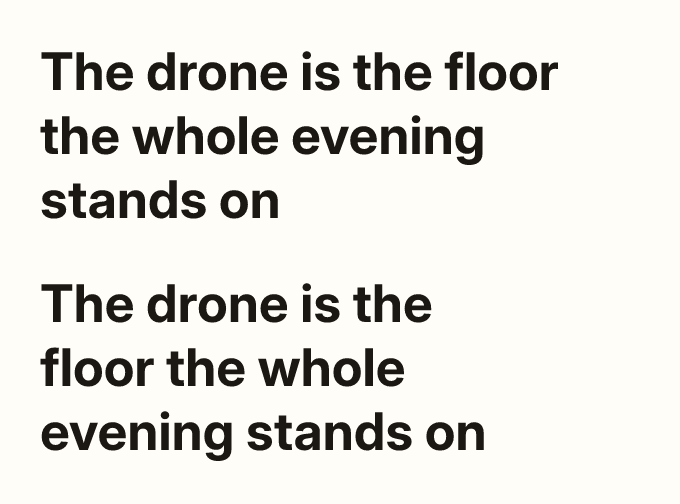
The same heading twice in a 300-wide box: filled line by line, its last line holds only "stands on"; with "balance": true its three lines come out nearly even.